
The problem with conventional machine translation post-editing (MTPE)
Training a conventional MT engine for high-quality output requires a significant up-front investment of engineering resources and time. Consequently, few boutique LSPs can actually afford to provide properly trained MT to their linguists. Instead, they are forced to plug into rigid, off-the-shelf engines and automated workflows designed by and for mega-agencies.
The burden is then shifted entirely onto the post-editing phase, forcing the linguist to fix deeply rooted problems caused by poor source-text preparation and inherent engine inadequacies.
“Translators are routinely forced to battle incorrect terminology, erratic style, and inconsistent punctuation. It is an exhausting, morale-killing grind that breeds resentment.”

Steven S. Bammel, PhD
Workflow Methodologist & Architect
Human and business cost
The reality is often even worse when dealing with complex files. Converting PDFs to Word documents introduces broken segmentation, “tag soup,” and OCR errors. When these formatting glitches collide with a standard MT engine in a poorly prepared source file, they trigger broken translations and uncontrollable, document-wide inconsistencies.
This leaves the translator trapped in a tedious cycle of retranslating useless MT, aligning all-over-the-place terminology, and manually fixing basic formatting—over and over again, from the beginning of the project to the end—all at reduced post-editing rates.
Ultimately, this friction leads to lower-quality client deliverables, which inadvertently drives clients to take their work to free AI tools that offer the exact same mediocrity at zero cost.
A premium workflow with GAIT-Augmented MT & MTPE
Now, consider a completely different paradigm.
-
Imagine a scenario where the translator never has to wrestle with tag soup or fix mechanical errors caused by careless file preparation.
-
Imagine a workflow where the baseline AI-generated machine translation is already highly readable, cohesive, and contextually accurate right out of the gate.
-
Imagine a dynamic process where the translator’s initial edits actively train the AI prompt, yielding more aligned, superior output for the remainder of the project.
Achieving this does not require high-priced enterprise systems and processes. It simply demands the right workflow.
By stripping away structural and mechanical friction right from the start, the translator finally gains the mental bandwidth to focus on strategic editing—delivering true excellence at an efficient pace that keeps everyone profitable. The GAIT-Augmented MT & MTPE workflow is engineered to deliver exactly this.
Deliver Better MTPE with Better MT
Replace rigid, machine-first output with a cooperative human-first post-editing workflow
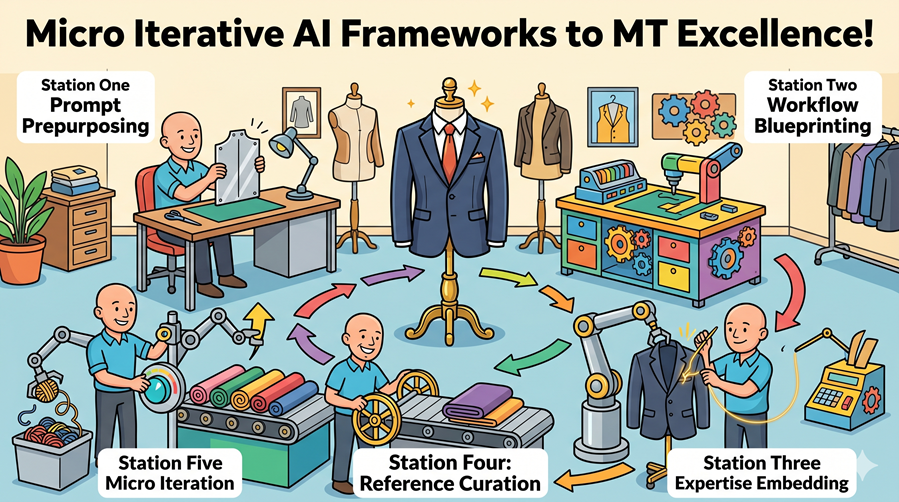
GAIT-Augmented MT & MTPE leverages the Micro Iterative AI Frameworks to deliver premium MT quality. By eliminating the root causes of standard post-editing friction, these frameworks transform the translation environment from a rigid, machine-first chore into a dynamic, human-centric process.
Here is how each framework elevates the overall value proposition:
-
Prompt prepurposing: Structurally optimizes AI instructions up front via the project anchor prompt, establishing a best-practice foundation for every single job
-
Workflow blueprinting: Replaces rigid constraints with a highly agile operational foundation, adapting the core workflow to efficiently manage even the most complex project specifications
-
Expertise embedding: Treats the AI as a collaborative tool rather than a static black box, directly integrating human mastery from client glossaries, project TMs, and continuous translator input
-
Reference curation: Guarantees higher baseline quality from the very first segment by focusing the AI on precisely targeted context via the anchor prompt, avoiding the noise of massive, unrefined databases
-
Micro iteration: Drives an active learning cycle as the project unfolds, turning a traditionally static process into a cooperative, real-time quality loop fueled by ongoing human refinement
The 12-Step Operational Blueprint
From end to end
How do these frameworks translate into actual project execution? The full GAIT-Augmented MT & MTPE workflow applies this philosophy through a rigorous, 12-step operational blueprint.
Designed to protect the linguist’s time and maximize the AI’s capabilities from start to finish, this methodology is divided into three distinct phases:
-
Phase 1: Precision File Preparation (Steps 1–6): Systematically eliminating mechanical noise, optimizing segmentation, and shrinking the active post-editing scope to create a base for the remainder of the workflow
-
Phase 2: Context-Aware AI Translation (Steps 7–9): Leveraging a project anchor prompt and strategic block translation to generate a highly fluent, cohesive initial draft
-
Phase 3: Strategic Post-Editing and Integration (Steps 10–12): Empowering the linguist to focus on high-level editing, followed by a strict propagation process that locks in document-wide consistency
The following describes exactly how the process unfolds, from initial project import to final delivery.
Phase 1: Precision File Preparation (Steps 1–6)
Step 1 – Clean and prep source files
Word files converted from PDFs often contain hundreds or thousands of unnecessary tags when imported directly into a CAT tool. While many of these can technically be ignored, forcing a translator to wade through them to separate the necessary from the unnecessary creates severe cognitive friction.
Worse yet, this “tag soup” introduces two more problems to the workflow:
-
Coherency: Excessive tags interrupt the AI’s ability to process the text contextually, frequently triggering broken or incorrect translations.
- Inconsistency: Random tag placement hides identical segments from the CAT tool’s analysis, misclassifying them as internal “fuzzy matches.” If these hidden duplicates are not isolated through additional manual processes, they lead to uncontrollable inconsistencies across the final translation.

To eliminate this friction before translation even begins, I execute customized profiles in TransTools and TransTools+, alongside my own custom macros. This process strips out the random font variations that cause excessive tagging and corrects other critical source file deficiencies, including: excessive or erratic spacing, incorrect quotation marks, hard line breaks, and OCR-related text variations.
By thoroughly prepping the source files up front, I minimize tags to reduce the workload in later steps.
Step 2 – Import into the CAT-tool environment
In theory, the GAIT-Augmented MT & MTPE workflow is compatible with any advanced CAT tool. However, I have meticulously fine-tuned my processes for memoQ translator pro, running everything through my local installation. This setup allows me to process any file format compatible with memoQ, including packages from other CAT tools.
Through deep technical know-how and strict attention to detail, I configure my file imports specifically to minimize billable word counts and maximize duplicate matching. To achieve the leanest, most efficient translation environment possible, I disable or omit non-essential overhead during import, including TM context matching, version tracking, preview creation, embedded objects, and alternative image text.

Step 3 – Inspect and optimize segmentation
To further maximize duplicate and internal fuzzy matching—and to provide both the AI and the translator with the cleanest possible file—I review the document segment by segment to ensure every line consists of a single, complete unit. This meticulous preparation phase relies on a disciplined, three-pronged approach:
-
Segment consolidation: Joining broken segment fragments back into cohesive, full segments
-
Strategic segmentation: Splitting multi-unit blocks into single-unit parts to improve translation memory matching
-
Isolation of non-translatables: Splitting off excessive tags, standalone numbers, and various symbols from the main text

Further, in files with complex formatting—especially Word documents converted from PDFs—a single sentence is sometimes split into fragments and separated by completely unrelated text in the CAT tool import. Using my own technique, I dynamically stitch these disjointed pieces back together for the translator without compromising the underlying file architecture, restoring them to their original layout positions during the final formatting stage. While this alignment is time-consuming, it represents another differentiator that directly protects final translation quality.
Step 4 – Lock out non-target segments
1. Repetition isolation
I lock out all secondary and subsequent repetitions, leaving only the very first instance unlocked in the text for post-editing. While rare exceptions exist where a duplicate word or phrase requires a different translation based on context, this is unusual within a single document or project.
Conversely, leaving repetitions unlocked but editable in the work file creates unnecessary cognitive friction for the linguist, who is unlikely to inspect each one individually anyway. This is especially true because most MTPE clients offer zero payment for repetitions—even if they fail to lock them out during their own file prep. My approach eliminates this uncompensated cognitive load up front.

2. Non-translatables exclusion
Next, I systematically isolate and lock out all purely mechanical elements that do not require human linguistic intervention, such as standalone numbers, symbols, and isolated tags.
3. Advanced internal fuzzy and near-duplicate removal
The final and most labor-intensive phase tackles internal fuzzy matches and hidden near-duplicates. This includes segments that are linguistically identical but structurally mismatched due to:
-
Formatting differences (e.g., a word bolded in one segment but plain in another)
-
Asymmetrical segmentation (corrected in my previous step, but with an added tag to indicate the separation)
-
Discrepant tag configurations
-
OCR-induced text variations
-
Identical text variations with easily automatable updates (such as shifting serial or large numbers)
I generally lock these out manually by alphabetizing the source text and evaluating them line by line. For files with high remaining homogeneity (a dense volume of internal fuzzies), I deploy an advanced alignment technique that hunts down and reconciles masked segments missed during the first pass. While this is a particularly time-consuming process, these segments remain locked out of the post-editing workflow to be populated and updated later based on the master text, maximizing total consistency.
The savings, scheduling, and quality impact
This rigorous filtration directly shrinks the post-editing scope, yielding savings in both translation fees and project turnaround times, while driving up final quality.
On a recent 130,000-word project, the compounding impact of this methodology was clear:
-
Standard duplicate removal: Dropped the initial count from 130,000 to 93,000 words (a CAT-leveraged savings passed directly to my LSP client).
-
Advanced clean-up: Systematically removing the remaining non-translatables and hidden internal fuzzies slashed the final post-editing scope down to just 69,000 words.
By stripping an additional 24,000 words completely out of the post-editing workflow, the client enjoyed a compressed timeline and a significantly lower invoice from the post-editor. I include an incentive-based billing line item on these projects to mutually share the rewards of these savings with my LSP client.
Crucially, this volume reduction doubles as a quality advantage, too. Generative AI workflows are inherently better at following complex stylistic instructions and maintaining internal consistency when they can process text within fewer, more concentrated context windows. By consolidating the core text and propagating the fuzzy matches from a single, verified baseline later, the entire document achieves a level of cohesive quality that standard, cluttered MTPE workflows cannot match.
Step 5 – Leverage existing translation memories
I now begin integrating existing project assets (if any) by pre-translating the remaining unlocked segments using the client’s translation memory.
Even when working with a target language I don’t understand, my technical familiarity with file and text architecture allows me to confidently confirm certain high-level matches:
-
100% matches: Automatically locked and confirmed
-
95–99% fuzzy matches: Manually evaluated and confirmed, as these minor deltas are usually caused by mechanical formatting variations, tag differences, or shifting numerals
-
Lower-level fuzzies: Identified and validated where the CAT tool misclassifies a true identical match due to surface-level discrepancies like punctuation (straight vs. smart quotes), spacing anomalies, minor OCR-recognition differences, or other causes.

By default, I leave these confirmed TM matches within the active post-editing scope to allow the linguist to review them in context. However, if my LSP client prefers to aggressively slash post-editing fees, I can lock these confirmed matches completely out of the active work scope as well, while still leaving them visible in the file for linguistic reference.
And there’s one more match type I lock out: remaining TM fuzzies of around 65-70% match and up. For now, I leave them untranslated and unconfirmed, but marked in the CAT tool as fuzzies so I can filter for them easily later. I will come back to them after machine translating all of the non-locked segments.
Because duplicates and internal fuzzies have already been isolated and locked out during the earlier steps, any contextual edits the post-editor makes to the active confirmed segments are automatically propagated through my follow-up processes to all corresponding segments. This introduces another quality upgrade over conventional workflows. Normally, when identical or near-identical segments appear throughout a document (or multiple documents), a linguist rarely remembers how they edited a specific iteration dozens or hundreds of segments prior and may not make the same edits in subsequent segments. This can flood the finalized TM with multiple, translation variations for the exact same source text—compromising the integrity of both the current document and the client’s master assets. By reducing the number of potential failure points, I promote much higher consistency across the text and prevent TM pollution.
I conclude this phase by completely clearing out all unconfirmed, low-level translations from the remaining unlocked segments, leaving only crisp, validated data for the AI engine.
Step 6 – Convert native formatting to inline tags
Because LLMs do not natively support text formatting, maintaining a document’s visual layout requires a workaround to prevent formatting loss. Fortunately, AI models handle inline tags exceptionally well—provided they are not overwhelmed by them. This means the AI can usually position inline formatting tags around the correct words and phrases in the target text, even when complex syntax changes from the source language to target language require switching the sentence order around.
To leverage this capability, I execute a specialized set of regular expressions (RegEx) within memoQ to convert all native formatting into inline tags. While this step inherently increases the immediate tag count, the system remains unburdened because the “tag soup” and mechanical noise were already eliminated during the earlier file preparation phases.

Once the formatting has been converted into these manageable inline elements, I can safely proceed with the AI translation process. This ensures that all structural layout information is preserved and easily restored to standard visible formatting once I get past the machine translation step.
Phase 2: Context-Aware AI Translation (Steps 7–9)
Step 7 – Build the core project anchor prompt
Once I’ve finished preparing the text for translation, I still have one more step: build out the initial project anchor prompt. An anchor prompt is a prompt that is carried across a project to maintain a single source of truth through multiple context dialogues. In the GAIT workflow, we use this prompt to leverage client resources and continually iterate and improve the output.
Why the anchor prompt is critical
When working with AI across long documents, differences and inconsistencies can creep into the translation. The anchor prompt addresses this by tackling several key challenges:
-
Consistency: It anchors the workflow to a fixed standard of output across multiple context windows. With a good anchor prompt, we can return to the AI on a different day with the same source text and still get almost the same output.

- Following instructions: It allows us to get the AI to follow specific instructions reliably.
-
Leveraging resources: It gives us the ability to integrate things like translation memory and terminology directly into the AI’s context.
In other words, a well-built anchor prompt can compel the AI to translate in the translator’s own voice, or in the voice of the TM, or even of just a related document, and to do so on demand, and consistently across multiple blocks of text. It is also remarkably effective at suppressing AI “machine speak”—such as the overuse of words like “seasoned” or “harnessing,” or the unnecessary use of em dashes.
Structuring the project anchor prompt
To build this foundation, I construct a multi-part prompt that starts basic and fills out as I add the reference materials. The basic structure consists of the following elements:
-
Setting: I orient the AI around a specific context, such as telling it, “You are an expert financial translator of Korean accounting audits to English”. This conditions the AI for the project task and subject matter.
-
Specifications: I provide specific instructions and rules for the project. This is where I can add key points of a project style guide to specify date formats, spellings, formality, and the like. I also include standard instructions like “keep each segment on its own line” and “don’t provide explanations or labels, just translate”.
-
Anchoring text (“gold standard”): This is the core reference material that reinforces the instructions. By feeding the AI this highly curated target text, the AI will begin to mimic that exact style and terminology.
-
I can include target-language monolingual text or aligned bilingual terminology to ensure the AI uses the correct vocabulary.
-
I can also integrate “gold standard” translations, which consists of closely related source and target segments (such as verified TM fuzzy matches or the translator’s own polished segments of the same document).
-
-
Final instructions and text: Finally, I give short instruction to “translate the following text:” or “revise the following text:” followed immediately by the actual text to be acted on.
Step 8 – Translate in context-aware blocks
Once the text has been completely prepped and the initial project anchor prompt is built, I begin the actual machine translation process. The golden rule at this stage is that I do not translate inside the CAT tool. Instead, I export the source text to a bilingual file and drive the translation from there.
The process is straightforward: I load the anchor prompt into my AI tool (CotranslatorAI), append a block of the source text to it, and send it to the AI. When the AI generates the target text, I paste it directly back into my bilingual file. This workflow is highly flexible. I can remain in the bilingual file until the entire job is finished, or I can continuously cycle between the file and the CAT tool—importing translations, manipulating the text, and exporting fresh bilingual files for subsequent untranslated segments.

Executing the translation this way unlocks four critical advantages:
-
Full-context processing: Translating in blocks of multiple segments at once (usually 24 to 36 segments) gives the AI the broad context necessary for highly accurate, coherent translations. This cannot be done inside a CAT tool. Even AI-based CAT plugins that claim to translate entire documents at once actually process the text segment by segment on the backend, which compromises context and degrades quality.
-
Intra-block consistency: Translating in blocks naturally compels the AI to translate every term consistently throughout that specific chunk of text in a single turn—a huge improvement over conventional MT engines.
-
Flawless tag handling: Tags copied directly from a CAT tool interface fail to transfer to the AI as readable text. By routing the text through a bilingual Word file, the inline tags we created earlier are preserved, safeguarding formatting.
-
Rapid execution: After investing so much effort into rigorous source text preparation, routing the translation through multi-segment blocks speeds up the process dramatically, providing a refreshing acceleration to the workflow.
Managing the context window (micro iteration)
The translation strategy does not stop simply at linear source-text block processing. Even with a perfectly prepared file and a bulletproof anchor prompt, we will inevitably introduce unwanted inconsistencies if we translate each block of text in its own context window.
To combat this, I use follow-up prompting (in CotranslatorAI we call it “ad-hoc prompting”). Instead of starting a new context window for the next block, I paste the next block of text as a follow-up prompt within the same AI dialogue. This keeps us inside the same context window, granting the AI access to previously translated blocks so it can naturally align the terminology and style of the new text with the previous text.
However, we cannot sustain a single context window forever. Eventually, the AI’s ability to efficiently process the core instructions, the growing prompt history, and the new text begins to degrade. In long documents, I must periodically clear the board and start over with a new AI dialogue.
This reset provides the perfect opportunity for micro iteration. When I restart the process, I actively update the anchor prompt to reflect the evolving project. If the document’s content has shifted, or if I need to add newly discovered words to the glossary, I apply advanced techniques to refine the anchor prompt before launching the next sequence.
By meticulously managing this cycle of block translation and context resets, I work my way through the document, continuously pushing the AI to the frontier of its translation capabilities.
Finally, once I finish translating all of the non-locked segments, I still have one step left. You will recall that I locked remaining fuzzy matches in Step 5 above, but left them marked as fuzzy matches in the CAT tool. I now go back and filter for those fuzzy matches and unlock them. I also pre-translate them on the spot and export them out to a bilingual file, with the fuzzy target text in the translation column. I then paste a special “fuzzy match translation add-on” to the project anchor prompt. This add-on is written so that when I copy and paste both the new source segment and the highest-value fuzzy match target segment in the translation column together into my translation tool (CotranslatorAI), it generates a new translation of the source text which matches the fuzzy match as closely as possible. This ensures once again consistency with the project TM and terminology, and do focus the AI’s attention as closely as possible on this task, I translate these fuzzy matches segment by segment, one after another.
Once I finish the fuzzy matches, the machine translation phase is complete. I import the finished bilingual file back into my CAT tool. This updates the project. I then confirm all unlocked segments and proceed to the next step.
Step 9 – Revert tags to native formatting
Now that the AI translation phase is complete and the populated bilingual file is safely back inside the CAT tool, the next step is to restore the document’s visual layout.
To achieve this, I simply reverse the earlier formatting workaround. Using a corresponding set of reverse regular expressions (RegEx) within memoQ, I transform the explicit inline tags back into standard, visible native formatting.
Because I carefully controlled the tag density and eliminated mechanical “tag soup” during the preparation phases, the AI was able to position these inline tags correctly around the corresponding translated words. As a result, when the reverse RegEx runs, the original layout elements—bold, italics, underline, subscript, and superscript—snap back into place, even in complex sentences where the target language required a completely different syntactic word order.

With the native formatting cleanly restored and the visual structure intact, the file is now highly readable and primed for the human post-editing and quality assurance phases.
Phase 3: Strategic Post-Editing and Integration (Steps 10–12)
Step 10 – Execute human post-editing
Once the AI translation and formatting restoration are complete, the project is ready for human post-editing. In standard MTPE workflows, this stage often creates friction, forcing highly skilled linguists to act as “janitors” cleaning up disjointed machine text and mechanical errors.
The GAIT-Augmented MT & MTPE workflow subverts this dynamic. By handing off a well-prepped, contextually fluent draft, we elevate the linguist to a strategic editor. For an LSP, this translates directly to faster turnaround times, higher final quality, and improved translator satisfaction.
Here is how this optimized handoff process delivers value to both the LSP and the post-editor:
- Platform agnosticism: To accommodate your specific operational needs and your linguists’ preferences, I can provide the files for post-editing in virtually any standard format: .xliff for their preferred CAT tool, bilingual Word files, or uploaded directly into your proprietary online TMS. I can even skip to the end of this workflow and simply export out the final machine-translated files so that the translator can post edit those.

-
Zero mechanical friction: Because the files were rigorously prepped and stripped of “tag soup,” broken segments, and OCR error impact in earlier steps, the linguist is freed from tedious cleanup tasks. Their billable time and cognitive energy are spent on linguistic refinement.
-
Eliminating the “Frankenstein Effect”: Standard MT engines process text segment-by-segment without being adapted to the project at hand. This creates a disjointed mix of TM hits and raw machine output. Because the GAIT-Augmented MT & MTPE workflow generates the translation in context-aware blocks driven by a single anchor prompt matched to a gold standard for the respective project, the linguist receives a cohesive, fluent draft in a unified voice.
-
Dynamic quality loops: On large, multi-batch projects, we can run an iterative workflow. If a linguist identifies an overarching structural preference or new terminology in the first batch, I can reflect that feedback directly back into the anchor prompt, upgrading the baseline quality of subsequent batches.
-
On-call linguist support: To ensure maximum efficiency and higher translator buy-in, I am even including direct, professional coaching for linguists new to this workflow as a complimentary part of my baseline service upon request. Many veteran translators are still working through this major paradigm shift, and if we do not actively help them adapt, you will not be able to work with your best linguists on a growing segment of your work. This certainly means more unbilled work for me behind the scenes, but if we don’t help our community step up to become strategic editors, who will?
To make sure this handoff fits into your existing operations, I offer highly flexible collaboration models during the post-editing stage. I can interface directly with the translators to provide guidance and gather iterative feedback, or I can route all communication strictly through your project managers—whichever approach best serves your team and your internal workflows.
Once the linguist has finalized the post-editing and quality checks, the completed files are routed back to me so I can convert the post-edited files into my deliverables to you.
Step 11 – Propagate edits and finalize segments
Once I receive the completed files back from the linguist, I import them into my CAT tool and officially confirm the post-edited segments. However, the structural work is not yet finished. The segments that were strategically locked out during the initial file preparation phase—such as duplicates, hidden internal fuzzies, and non-translatables—must now be reconciled against this newly vetted master text.
To ensure quality control, I execute a strict, cascading propagation process:
-
TM isolation and purity: First, I isolate the newly post-edited segments into an active, working translation memory. If the project utilized legacy client TMs, I create a brand-new TM populated only with this freshly vetted post-edited output. This creates a firewall, ensuring that no unvetted or legacy segments accidentally overwrite our finalized translation.

- Exact match propagation: With the clean TM established, I unlock all previously locked segments and pre-translate for 100% exact matches. This updates all standard duplicates across the entire document using the linguist’s finalized translations, ensuring consistency throughout.
-
High-fuzzy reconciliation (95–99%): Next, I pre-translate the high-level fuzzy matches. I review and confirm these one by one, utilizing auto-propagation to instantly update any internal repetitions tied to these specific segments.
-
Masked match resolution: I then run a pre-translation pass for any remaining TM hits. This deliberately captures the hidden near-duplicates that registered artificially low fuzzy match scores due to earlier OCR discrepancies, tag variations, or other significant formatting differences.
-
Non-translatable verification: Finally, I conduct a thorough sweep of the remaining non-translatable segments (numbers, isolated tags, symbols) to ensure that every element requiring translation has been addressed.
By strategically controlling how the human edits are populated back into the locked segments, this process guarantees that the highest standard of quality and consistency is pushed into every single corner of the final document.
Step 12 – Export and deliver final assets
With the translation integrated and verified, I export the translation back into the native, original format.
This is where the final structural puzzle pieces are put back into place. As mentioned during the initial file preparation phase, complex documents—especially Word files converted from PDFs—sometimes contain fragmented sentences separated by unrelated text. During prep, I dynamically stitched these fragments together to give the translator a clean, cohesive sentence. Now, using the markers I embedded earlier, I transfer the translated target text fragments back into their original layout positions without corrupting the underlying file architecture.
To ensure clear expectations and a smooth handoff, this final stage is defined by two key principles:

-
The DTP boundary: While I meticulously restore the native tags, inline formatting, and structural architecture, I do not perform manual desktop publishing (DTP) adjustments (e.g., fixing page breaks or adjusting text boxes for expansion). The final visual polishing and post-DTP linguistic review remain your responsibility to execute in-house or with your chosen resources.
-
Total transparency and asset delivery: I do not hold your data hostage. Upon completion, I deliver the final formatted native files, all intermediate files generated throughout the workflow, and the fully updated project translation memory.
This comprehensive handover establishes a crystal-clear audit trail of my entire process. It honors your ownership of the project assets and control over your data, fully equipped and ready to leverage those resources for your next project.
An End-to-End Workflow for Translators, Too
Master the GAIT Workflow
If you are a translator and are interested in the methodology detailed above, you can learn the Generative AI Iterative Translation (GAIT) workflow and implement it directly into your own autonomous translation projects.
While you can encourage your boutique LSP clients to adopt the full GAIT-Augmented MT & MTPE workflow to improve the quality of their MPTE services, mastering GAIT for your independent work places you fully in control. By proactively guiding the AI through an iterative, context-aware cycle, you can:
-
Speed up your work and increase your earning potential without sacrificing accuracy
-
Deliver superior quality by training the AI to match your authentic voice and terminology right out of the gate
-
Match any client budget—whether high or low—by strategically scaling your effort to fit the project
-
Maintain tool independence by integrating the workflow with your existing CAT-tool infrastructure and preferred AI platforms

Adapting the Workflow for Premium Raw MT
Sometimes timelines are tight or project budgets simply won’t accommodate human post-editing. When a client needs the speed and cost-efficiency of raw machine translation, they typically have to settle for the disjointed, error-prone output of automated “free” or paid MT tools.
The GAIT-Augmented MT & MTPW workflow offers a competitive alternative: premium raw MT.
If your client decides to bypass human post-editing, the overarching workflow remains virtually identical, leveraging all the rigorous preparation and contextual AI advantages, but with a key adjustment to Step 10. You have two options:
-
Option 1: The direct raw MT approach – I execute Steps 1 through 9 exactly as described. The file is meticulously prepped, tags are protected, and the translation is generated in context-aware blocks driven by the project anchor prompt. I simply skip Step 10 (human post-editing) entirely and move straight to final integration and formatting restoration. Because the AI was guided by a highly controlled prompt and stripped of mechanical friction, the resulting raw MT is remarkably cohesive, properly formatted, and far superior to standard off-the-shelf MT engines.
-
Option 2: The strategic sampling approach (micro-MTPE) – To elevate the raw output even further when high-quality translation memories and/or termbases are unavailable, we can apply Step 10 to a small, representative sample of the document first. A human linguist edits this initial portion, and I immediately feed that “gold standard” translation—along with the translator’s key terms and instructions—back into the project anchor prompt before the AI processes the rest of the text. This injects human-level polish and project-specific accuracy into the source loop, beautifully aligning the remainder of the document for a fraction of the cost of full post-editing.
Both approaches ensure that even when your client is in a crunch, they receive a structurally sound, highly fluent product that outperforms standard, automated MT solutions, saving both time and money.
