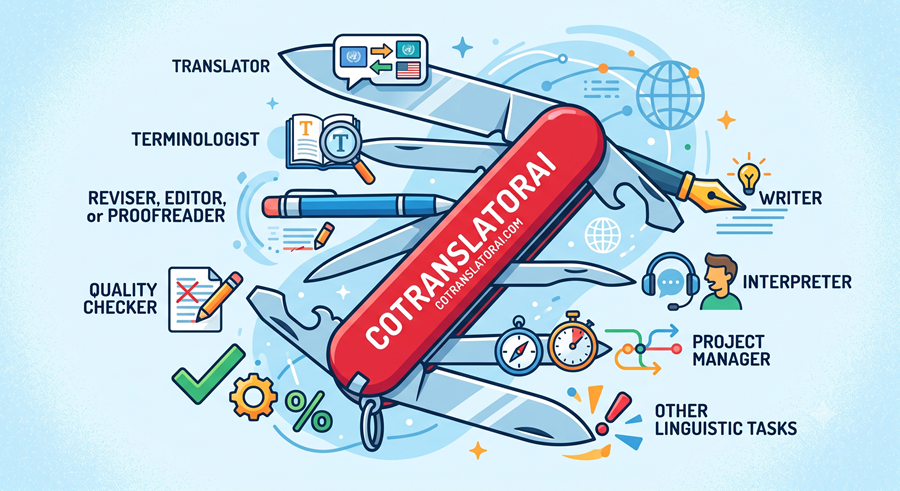
If you think CotranslatorAI is just another engine for generating translations, you are barely scratching the surface. Instead, think of it as a Swiss army knife to support everything you do daily as a translator, including tasks you perform inside or outside a CAT tool and in other AI apps.
Depending on the situation, CotranslatorAI can step into a primary role or act as a background support tool. In either case, it helps you build and manage human-directed workflows that address gaps left by traditional solutions.
Because the software can adapt to many different challenges, no single list can capture every possible application—and new ones continue to emerge. The guide below explores roles we and our community have discovered so far.
We hope it gives you a broader understanding of CotranslatorAI’s capabilities and inspires you to find new ways to incorporate it into your work.

Steven S. Bammel, PhD
Co-Creator of CotranslatorAI
Not Just Translation
CotranslatorAI does so much more!
Primary Translator Roles
Not long ago, translation involved sitting down at a computer with a source document and typing the same document in a target language. Translators completed every step manually, from drafting and researching terminology to polishing the translation, conducting the final QA, and delivering the finished document. The job required a lot of work, but the process was straightforward.
Today, we work in a far more fragmented and complex environment. Falling rates force us to become more efficient, while better AI-only drafts require that we deliver even higher quality to stay competitive. The mega agencies and machine translation providers are also hot on our heels, developing automated workflows that seek to replace us. To remain relevant, we must dramatically increase our productivity across a wide range of translation workflows while regularly handling new terminology, unfamiliar subject matter, and file-formatting challenges.
As the translator’s role grows more complex, CotranslatorAI serves as your process partner, helping you address the challenges you face every day.
Translator
The CotranslatorAI interface helps you get the most value from working with AI during translation, whether you use it spontaneously for small tasks, for large and lengthy jobs, or for ongoing projects over time. It can support you both within and outside a CAT tool, and you can still get help from CotranslatorAI while working in online translation environments mandated by clients or alongside workflows that use other AI-powered tools and functions.
At the most basic level, you can write a simple prompt with instructions to translate a text into a particular language, followed by the source text to translate. This will produce a quick translation, often a good one. But to produce translations that meet specific client requirements, or that are matched to your style, you should create more advanced prompts—called “anchor prompts” in CotranslatorAI parlance—that provide the AI with reference information about the document, specific instructions for performing the work, a glossary of key terms, and even example target segments or source-and-target segment pairs. These example segments can be your own work from the same or a similar document, or from a translation memory, or any other information source you choose. The AI uses this reference information to identify patterns and then output translations that align more closely with your intent.
Not only can you customize an anchor prompt to the document at hand, or even to a specific section of the current document, but you can also adapt prompts to individual clients, document types, and language pairs, and then save them for fast reuse later. And you can iteratively improve these prompts on every project, ensuring that the AI’s support gets better over time.
In CotranslatorAI, you are not limited by the prompts you write, or the number you use together. They can be as short or as long as you need. In addition to including reference information in the prompt itself, you can write prompts that, when run, ask for specific information that the AI can use to customize your output on the fly. You can tell a prompt to translate first and then revise second. You can also use prompts sequentially. Many users find that applying two independent prompts—first running a text through a translation prompt and then immediately through a revision prompt—produces even more fluent final output. In fact, using a series of creative prompts is the best-practice approach for transcreation workflows.
Document context can be further enhanced with advanced text manipulation techniques that translate a few or dozens—or even hundreds—of text segments at once within a single AI pass. Furthermore, within CotranslatorAI, you can then continue within that same context window page after page, obtaining all the benefits of richer context, while still returning translations to the translation memory in your CAT tool. This lets you run automated QA routines, filter segments in advanced ways, work in a familiar segment-based interface, and meet strict delivery requirements. These techniques coupled with a robust anchor prompt ensure that your output stays consistent, correct, and fluent from beginning to end.
You can apply prompts (or prompt modules) to translate source segments to match existing TM fuzzy matches, both using previous source-and-target segments, or target-only fuzzy matches, and get nearly perfect in-context translations, even with fuzzy match values as low as 60-70%.
Within difficult and non-standard translation environments, CotranslatorAI can be used alongside OCR technology to translate text that cannot otherwise be edited, within client interfaces not designed for efficient translation environments, from PDF files to Word files, in projects with complicated and unusual translation specifications, and everything else in between.
Terminologist
CotranslatorAI is a powerful tool for terminology research. As in ChatGPT or Copilot, simply ask for a definition, explanation, example sentences, alternative terms, or other information about terms and phrases. You will get the AI’s answer in whatever language you request. Because you always have unthrottled access to the latest models, you can be confident that you are receiving the best available responses. And because the Main Window also serves as a chat interface with the AI, you can ask follow-up questions and receive complete answers for terminology-related use cases.
In fact, CotranslatorAI gives you an extra advantage here. If you are using the program to help you translate, you already have a context window open and focused on the document at hand. When you conduct your terminology research within the same translation flow, your requests are already on topic. You do not need to give the AI additional context or wade through multiple definitions to find the right one.
CotranslatorAI is a useful tool for creating glossaries. Because you can save prompts in your Prompt Library, you can write instructions that reliably produce glossaries in exactly the style you need and reuse those instructions every time. For example, a basic glossary-generation prompt can query a text and extract key words. It can then create a monolingual, bilingual (or even trilingual!) glossary related to that text, producing dozens of source words and phrases along with their in-context terms in the target language. You can request the output in any format you need, from Excel to HTML, and paste the AI’s output directly into the interface where you work. Working in CotranslatorAI enables more precise data retrieval than retrieval-augmented generation (RAG). Although querying data in CotranslatorAI can be more expensive when working with very large databases or high query volumes, most human-directed translation workflows do not consume enough tokens for the cost to become significant. With an AI-generated glossary in hand, you have a strong starting point for refining and finalizing terms much more quickly and at a higher level of quality than you otherwise could.
Finally, CotranslatorAI and Generative AI offer one more terminology advantage over conventional alternatives. Terminology selected by the AI in a translation workflow that uses best practices has been shown to be more accurate than terminology produced by neural machine translation engines. Those engines do not translate with robust context and do not possess the knowledge of the world available to Generative AI. This means that when you work in CotranslatorAI, you get better terminology right from the start, even without a deliberate terminology research effort.
Editor/post-editor
While CotranslatorAI excels at supporting you in translation tasks—especially when you pair it with the human-driven methodology we advocate—it is also a valuable tool for editors, post-editors, revisers, and proofreaders, all of whom take a monolingual text and improve it in some way.
Anchor prompting is not just for translation; it can be used for monolingual post-editing tasks as well. All the principles of anchor prompting described above for the translator role, as well as in the free and paid CotranslatorAI training, apply equally to editing and post-editing. Instead of translating from Language A to Language B, you revise from Language B1 to Language B2. This is especially useful when a translated text contains flaws or stylistic issues that can be improved predictably and repeatedly throughout a document.
CotranslatorAI can support you at a more granular editing level too. Sometimes you need to address one-off issues that arise unexpectedly or handle a wider range of edit types than you can efficiently include in an anchor prompt, especially when executing in-line edits in a machine translation post-editing (MTPE) workflow. CotranslatorAI accelerators such as built-in and custom keyboard shortcuts and the Quick Run menu are designed specifically for these situations. Many editing tasks involve minor corrections that would require only a few keystrokes without AI assistance. So the net benefit of an accelerator on one fix is small. But the gains add up when similar edits are needed repeatedly. With accelerators in CotranslatorAI, you can call up and apply a wide variety of prompts (essentially, as many as you can keep track of) to individual words, phrases, sentences, and paragraphs. These mini prompts can perform tasks as mundane as splitting a long sentence into two; converting spelling, punctuation, and style from one dialect to another; or rewriting text to a specific readership.
These days, nearly every text-editing app comes with its own editing toolbar. These toolbars are often difficult to customize, and even when customization is possible, they remain confined to the provider’s ecosystem. With CotranslatorAI, you can create a menu of editing prompts customized precisely for your needs, with results that match your instructions. You can then use these editing tools in any Windows text editor. This gives you a single source of truth for your prompting work, improving efficiency regardless of the editing or post-editing environment you use. It also lets you apply the same prompts consistently everywhere while continuing to iterate on and improve them as needed. And these use cases may not be limited to translation jobs; they can also be applied to daily activities such as writing emails, blog posts, and the like.
The Compare tool provides one more especially useful outcome for editors and post-editors. After running an editing prompt on a text, you may not easily notice every change the AI has made. As we know, the AI is not always reliable in following directions, so you must check everything carefully when perfection is the priority. With a single click in CotranslatorAI, you can open a Word file in Tracked Changes mode that shows exactly what changes the most recent prompt made to a text. This saves time, reduces cognitive load, and prevents oversights.
QA/QC specialist
These days, automated, AI-powered quality assurance is all the rage in the industry. Many see it as a way to reduce human involvement in the translation process while saving time and money. Translators would do well to challenge that narrative by consistently delivering higher-quality work ourselves. With CotranslatorAI, you can execute custom prompts for use cases that help you deliver as close to perfect as possible every time.
Prompts in CotranslatorAI can check a text for spelling, punctuation, grammar, and other mechanical errors. You can create a prompt customized for the project at hand to ensure compliance with the client’s style guide, project instructions, and terminology list. You can use another prompt to compare the source and target for accuracy of meaning. Combined with a full anchor prompt, you can check all these elements at once. You can even use step-by-step prompting to have the AI perform a complete round-trip back-translation process, including validation, to take your quality control to another level.
All these methods offer robust ways to strengthen your own manual quality control as a translator during a structured workflow. But perhaps the lowest-hanging fruit is simply to take a completed translation that you have already checked and are about to deliver, then export the bilingual text from your CAT tool to Word. Select the source and target columns and paste them directly into a CotranslatorAI prompt written to identify mistranslations and other general mistakes. It’s easy and fast and helps to squeeze out last minute improvements. You can easily put this prompt in your Favorite prompts menu for effortless access. The only downside to this approach is the effect on your ego when the AI finds things to fix in a translation you already checked carefully on your own.
We know that neither AI nor humans are perfect at everything. Quality checks in CotranslatorAI can produce false positives that you must review, and they can also miss errors. You can find more errors by simply asking the AI to check repeatedly, but this involves a tradeoff between the benefits and the effort required. Even so, AI provides a powerful final layer of quality checking after you have done your best work and run all your CAT tool’s QA checks. A toolbox of CotranslatorAI prompts customized for you and your language pair enables you to deliver better work than ever before.
Additional Roles of Translators and Other Language Professionals
The CotranslatorAI design team is made up of translators, so we have designed the software to support the many demanding tasks translators perform every day. Yet translation professionals now do far more than translate. With its innovative Main Window, unlimited Prompt Library, productivity accelerators, and other advanced features, CotranslatorAI can readily adapt to the adjacent roles performed by translators and other language-industry professionals.
CotranslatorAI can support you in any of the roles described below.
Interpreter
Interpreters often receive speeches, presentations, and technical documents shortly before an assignment. CotranslatorAI can help you prepare these materials quickly by translating selected passages directly inside PowerPoint, PDFs, and other applications. For a PDF that is difficult to edit, you can place the translation in a comment beside the original text.
The tool can also support you during an assignment. By mapping CotranslatorAI shortcuts to buttons on a silent mouse, you can select and translate text in the booth without typing or creating distracting noise. You can display the source and target text together, making it easier to follow presentation slides, figures, and specialized terminology.
This is especially useful at technical or scientific events. CotranslatorAI can rapidly translate terms such as chemical compounds, electrical components, and other specialized vocabulary. This reduces your cognitive load and helps you concentrate on the speaker’s message.
You can use CotranslatorAI to create bilingual glossaries from conference materials as described in the Terminologist section above. These glossaries can be shared with your boothmate and/or imported into your interpreter tools.
CotranslatorAI does not replace thorough preparation, but it can provide valuable support when time is limited. It helps you process materials faster, manage terminology more consistently, and focus more of your attention on delivering an accurate and fluent interpretation.
Project manager
As a project manager, you need to balance quality, cost, deadlines, client requirements, and your linguists’ capabilities. CotranslatorAI can simplify and improve this work in many ways.
You can create repeatable, project-specific workflows that boost efficiency, consistency, and quality. You can write workflow prompts in a language each translator understands and reuse them for recurring clients and document types.
For example, you can create individual prompts—or sets of prompts—that include approved terminology, style rules, formatting requirements, reference materials, and even the project instructions themselves. In CotranslatorAI, you can save these preloaded prompts together in Tab Collections and share them with your translators. This is particularly helpful for complicated tasks, when team members have limited experience writing their own prompts, or when they must work with unfamiliar translation tools or content.
Before delivery, custom prompts let you add formatting to a language you do not know, make last-minute linguistic changes and corrections, or check individual segments for accuracy. You might even need to ask the AI for a second opinion on a client’s feedback about a translation or simply run a single prompt over a full text (as long as it is not too long at once) to catch any final issues that your standard QA processes might have missed. You can even use CotranslatorAI to back-translate an entire document quickly and economically before executing a full linguistic validation. Regardless of the language pair, CotranslatorAI gives you the working-level intelligence you need to interact effectively with clients and translators and consistently deliver good work.
You can use the same prompts for any language pair simply by changing the languages in the prompts, something that can be done easily with variables. Better yet, you can define languages in the System Prompt so that prompts in every tab are updated at once.
By adopting the GAIT-Augmented MT and MTPE workflows, you can give your end clients more options at higher quality levels when they need to save money. This lets you build stronger relationships with your clients. Because these workflows do not require you to connect to an expensive system, you can use them today, especially if you outsource the work to a qualified expert.
A project manager’s workday encompasses a wide variety of tasks beyond the use cases listed above. CotranslatorAI can assist with many of the tasks described elsewhere on this page, particularly those associated with the roles of communicator, language technician, and workflow designer.
By turning your expertise and client knowledge into reusable prompts and processes, CotranslatorAI helps you coordinate linguists, maintain quality, respond faster, and manage a larger volume of work with less administrative effort.
Communicator
As a translator, interpreter, project manager, or just about anyone doing business today, you need to communicate with customers, suppliers, vendors, and colleagues. CotranslatorAI can help you compose emails and other original content just as effectively as a standard chatbot, but it truly excels at creating templated communications you send frequently.
By turning these communications into CotranslatorAI prompts, you can easily customize them in your own style and ensure that they always include everything required for that particular type of communication. For example, by including your rates and standard conditions in a prompt, you can quickly draft polished replies, quotations, and proposals. In many cases, the AI can match a response to a template simply by adding the original writer’s email and responding to it within the designed prompt structure.
CotranslatorAI is also a great tool for improving your writing in a language you do not speak natively. You can write the message yourself first and then use a keyboard shortcut to call up a CotranslatorAI prompt to critique it, fix it, and teach you how to do better next time. This allows you to quickly polish what you want to say. Done right, you can also avoid having your emails read as AI slop.
Another use case involves templated emails from programs that generate one type of response. If you need to adapt this message to multiple scenarios, you do not have to return to the program and create multiple original templates. Instead, you can use one template and run it through adjustment prompts that flexibly transform it into the necessary wording.
When publishing set content, such as a newsletter, blog, or newspaper column that must follow a particular format or fit a workflow you have developed, you can write prompts in CotranslatorAI that accommodate all these requirements seamlessly. This is particularly useful for social media posts, as chatbots today are conditioned to produce monotonously similar content. Although you cannot eliminate this tendency entirely in CotranslatorAI, the tool connects to the AI more transparently and directly than a public chatbot does, allowing you to adjust your prompts to create consistent variety and more closely approximate your own voice.
When sending communications to multiple people, a good prompt can generate the same output for each person on a list while customizing it according to the provided specifications, such as names, languages, word counts, and other details. With well-designed workflows, you can do this efficiently.
Language technician
Today’s language professionals handle many technical tasks and CotranslatorAI can help with those, too.
For example, many translators find regular expressions difficult to create and use. Yet they can be invaluable for tasks such as filtering segments in a CAT tool according to specific linguistic criteria. This can facilitate quality assurance, terminology replacement, source-segment cleanup, and many other aspects of a translator’s work. With the right prompt, you can even ask CotranslatorAI to write those regular expressions for you. In reverse, a prompt can explain what an unknown regular expression does.
The same applies to Excel formulas, AutoHotkey routines, HTML, and more. You can write prompts that align source and target texts and even generate a TMX file to import into your CAT tool. When you need a specific character or symbol, you can quickly get that too. CotranslatorAI will even provide its Unicode code point if you ask.
CotranslatorAI makes long reference documents easier to use. Open a new tab and then paste in a style guide, set of client instructions, user manual, contract, glossary, or other lengthy document. Ask specific questions whenever you need to find or clarify something during your work.
It can serve as a powerful text-processing tool as well. Use it to extract email addresses, add up numbers, reorganize information, or perform other clipboard-like tasks. You can ask it to draft new prompts or critique and improve prompts you already use. CotranslatorAI is equally useful for brainstorming both linguistic and non-linguistic ideas. And in a pinch, CotranslatorAI also works well as a chatbot, too.
Working with an imperfect source file? CotranslatorAI can help clean and format OCR output, reconstruct tables, remove unwanted timestamps and line breaks from an SRT file, simplify difficult source text before translation, or suggest possible meanings when a text is unclear. These capabilities can reduce manual formatting and eliminate unnecessary workflow steps.
It is also useful for general technical questions, from instructions on working in Windows or Microsoft Office to using CAT tools and other software. CotranslatorAI does not browse the internet, which helps protect privacy, but current language models still contain a substantial amount of recent knowledge that you can access simply by asking.
Of course, many of these tasks can also be performed with a general-purpose chatbot. CotranslatorAI’s advantage is that it brings all this directly into a single, translator-friendly workflow. The streamlined, text-only interface removes formatting from output by default, helping you stay focused and making results easier to reuse. Frequently used prompts can be saved in the Prompt Library, and the tool is always available with as many extra tab sessions as you need, so you do not need to keep several separate AI applications open at once.
Workflow designer
As a language professional, you can either passively accept workflows designed by others or find ways to improve on them. You can do this by building overlay workflows over existing translation processes and by designing your own independent workflows. CotranslatorAI gives you maximum flexibility to engineer these so you can improve your productivity and independence.
Other pages on this site document several human-driven workflows that we have designed for use in CotranslatorAI. Check them out; they may be just what you need. However, you don’t have to stop there because with CotranslatorAI, you can find new ways to harness the AI’s full capabilities without handing control over to automation.
One straightforward approach to making prompts work in multiple scenarios is to use variables in a prompt. By turning language pairs, subject matter, or other interchangeable parts of a prompt into variables, you can change their values and have those changes automatically reflected throughout the prompt. You can also add variables to a system prompt (briefly explained above).
Going a step further, modular prompting makes templated prompts even more versatile. You can create a standard anchor prompt with placeholders for project-specific reference information, then insert the relevant content as needed. Reusable reference material can be stored in the Prompt Library, allowing you to quickly assemble powerful, complete prompts from individual components.
This modular information can be pasted directly into the prompt in the Instructions field of the Main Window. Alternatively, you can write the prompt as a script that requests each required piece of information before proceeding. Once the prompt has all the information it needs, it then produces a new output that reflects everything provided.
You can write master prompts to merge prompts and otherwise produce custom prompts. For example, you can combine a client-specific anchor prompt with a reusable GDPR prompt for the data-protection section of a contract. Organizing these resources by client, language pair, and project type creates a valuable library that reduces preparation time and promotes consistency, all of it being your intellectual property that you own and control.
Workflow design also involves planning all the use cases required for a particular project. You can place these use cases in individually labeled tabs in the Main Window, ready to deploy. You can then save the tabs as a Tab Collection for reuse and sharing (also explained above).
Planning out how to use accelerators is also critical. CotranslatorAI includes various accelerators, and the best method to use depends on your working style and how it interacts with individual projects and project environments. You can choose built-in keyboard shortcuts for repeatedly using prompts that are already loaded, custom prompt keyboard shortcuts for individual prompts you want to call up at a moment’s notice, Favorite prompts for quick access in the Main Window, and Favorite prompts for quick access through the Quick Run menu, which is particularly useful in post-editing workflows.
Furthermore, although CotranslatorAI is a powerful tool capable of executing hundreds of use cases within a language professional’s workflow, it is a text-based tool designed to support translator focus and tidy output. It does not support multimedia applications or provide real-time access to websites and other applications that may be needed at a given time. But that doesn’t mean CotranslatorAI is not useful in these situations; you can still keep your prompts for these other use cases in your Prompt Library, which is designed to make prompts quickly accessible in other AI tools. For example, you can load prompts directly from the Prompt Library into another tool’s text-entry box. You can also copy the prompt currently loaded in the Main Window to another AI interface, allowing you to compare outputs across different models and interfaces.
Finally, you should consider the interaction between CotranslatorAI and your translation environment. When working in a CAT tool, you must usually handle text segment by segment. CotranslatorAI, however, offers various techniques for overcoming this limitation. A robust anchor prompt is a first step, and translating continuously through the Ad-hoc Prompt field in CotranslatorAI also builds context. More advanced techniques support the insertion of multiple segments at once into the Segment field for processing. These range from using advanced settings and keyboard shortcuts in CotranslatorAI to using screenshot OCR to extract dozens of segments from a CAT tool at once. You can even work with exported bilingual Word files in the Generative AI Iterative Translation workflow, where hundreds of segments can be translated at once while preserving segmentation for compatibility with modern workflows.
With CotranslatorAI, there is virtually no limit to what you can design. By combining these possibilities with everything else the tool offers and continuing to explore its potential, you can substantially increase your productivity across all kinds of translation tasks. CotranslatorAI enables you to do so in ways, and with a level of flexibility, that no other tool provides.